 Music Tools for Windows
 Music Tools for Mac


How to Remove DRM from Kindle Unlimited Books: Easy Step-by-Step Guide
How to remove drm from kindle unlimited? Here are two valid methods to help you convert kindle unlimited to pdf or epub.
Can I stripe DRM from Kindle Books? Yes, here are two methods to remove drm from kindle books.
Quick Comparison: Which Method Should You Choose?
| Feature | imElfin eBook Ultimate | Calibre + DeDRM Plugin |
|---|---|---|
| Ease of Use | Very easy – no plugins or commands needed | Requires plugin setup, sometimes command line |
| Works with Latest Kindle for PC? | Yes (works with Kindle for PC 2.8.0+) | Works with Kindle app versions, but you need to use command line to get it work |
| Supports 2025 KFX Books? | Yes | Usually not – fails on newer DRM |
| Cost | Paid software | Free |
| Best For | Beginners, those wanting a one-click solution | Tech-savvy users, familiar with command line |
Method 1: Using Calibre & DeDRM Plugin (Free)
This method requires several steps and may not work with the latest Kindle books or Kindle for PC versions.
What You'll Need:
- Calibre (latest version)
- DeDRM Plugin (v10.0.9 or v10.0.14)
- KFX Input Plugin (for KFX format books)
- Kindle for PC version 2.4.0 or older (newer versions may not work)
Steps for handling older kindle books:
Step 1: Install Calibre
Download and install Calibre from calibre-ebook.com.
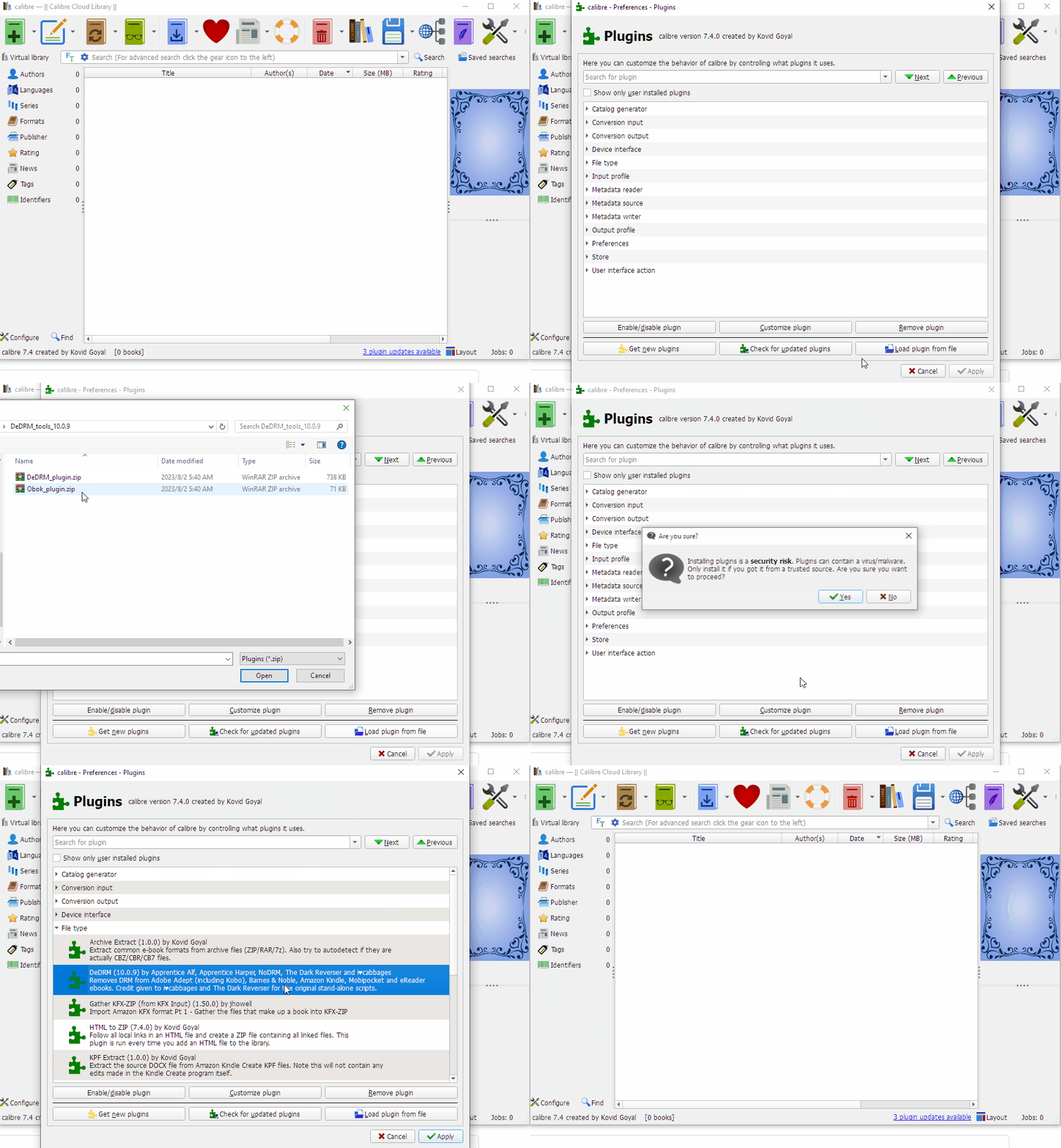
Step 2: Install the DeDRM Plugin
- Download the DeDRM plugin from GitHub
- Unzip the file—you should see
DeDRM_plugin.zip - Open Calibre >> Preferences >> Plugins >> Load plugin from file >> select
DeDRM_plugin.zip
Step 3: Install the KFX Input Plugin (if needed, in must cases you need it)
- Download from MobileRead
- Install the same way as the DeDRM plugin
Step 4: Download Kindle Books
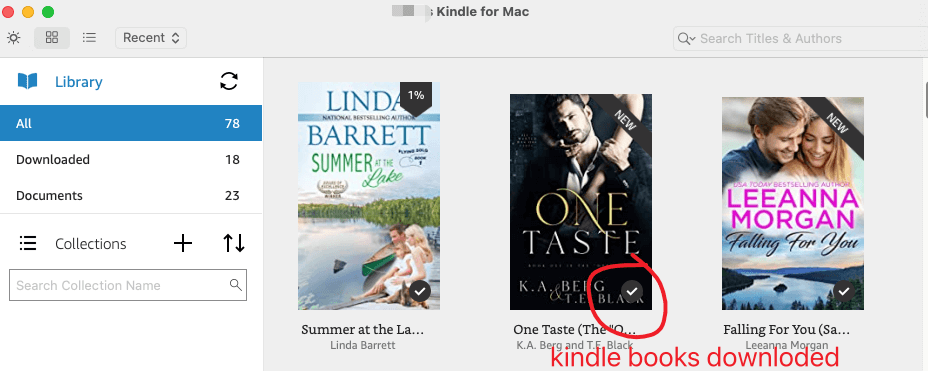
Use Kindle for PC (older version K4PC 2.4.0) to download your books. They will be saved in My Kindle Content folder.
Step 5: Add Books to Calibre for removing drm
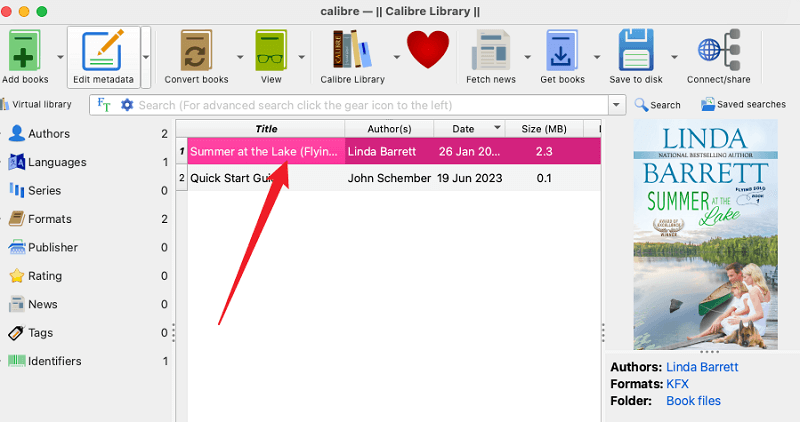
Drag your .azw or .kfx files into Calibre. The DRM should be removed automatically if everything is set up correctly.
Step 6: Convert kindle to pdf, epub or any of your desired format
Select the book in Calibre, click Convert, and choose your output format (EPUB, PDF, etc.).
Advanced: Extracting Kindle Keys for Calibre (KFXKeyExtractor Method)
This section is for users who need to remove DRM from Kindle books using the latest Kindle for PC 2.8.0 with Calibre. It involves command-line steps and is more technical.
What You'll Need:
- Calibre (v8.13 or newer)
- DeDRM Plugin (v10.0.14 or newer)
- KFX Input Plugin (v2.26 or newer)
- Kindle for PC version 2.8.0 (no other version will work)
- KFXKeyExtractor28.exe (comes with the DeDRM tools download)
Step-by-Step Setup Calire dedrm plugin:
1. Download and Prepare the Tools
- Download the latest DeDRM tools 10.0.14 from GitHub
- Unzip the downloaded file—you should see both
DeDRM_tools.zipandKFXKeyExtractor28.exe - Install both the DeDRM plugin and KFX Input plugin to Calibre via Preferences >> Plugins >> Load plugin from file
2. Set Up Kindle for PC 2.8.0
- Install Kindle for PC 2.8.0
- Important: Do not use any other version. Older or newer versions will not work with this method.
3. Copy the Key Extractor Tool
- Locate
KFXKeyExtractor28.exein your unzipped DeDRM folder - Find your Kindle installation folder:
- Right-click the Kindle desktop icon >> Open file location
- Usually at:
C:\Users\[YourUsername]\AppData\Local\Amazon\Kindle\application\
- Copy
KFXKeyExtractor28.exeto this Kindle application folder
4. Extract Your Kindle Keys Using Command Prompt
- Open Command Prompt (search for
cmdin Windows) - Type the following command, replacing
[username]with your actual Windows username:C:\Users\[username]\AppData\Local\Amazon\Kindle\application\KFXKeyExtractor28.exe "C:\Users\[username]\Documents\My Kindle Content" kindlekey.txt kindle_account.k4i - Press Enter. If successful, you won't see much output—just a new command prompt line.
5. Find Your Key Files
After running the command, look in your User folder (usually C:\Users\[username]\) for two new files:
kindlekey.txtkindle_account.k4i
6. Import Keys into Calibre
- Open Calibre >> Preferences >> Plugins
- Find DeDRM Plugin in the list >> Click Customize Plugin
- Under Kindle for Mac/PC ebooks:
- Click Import Existing Keyfiles >> Select
kindle_account.k4i - Click the textbook icon >> Select
kindlekey.txt
- Click Import Existing Keyfiles >> Select
- Click OK, then restart Calibre
- Now you can add your kindle books to Calibre for removing drm.
7. Video tutorial for removing kindle kfx with kindle key extractor
Troubleshooting Tips
- Command not working? Make sure the Kindle content path is correct. By default, it's in
Documents\My Kindle Content\ - Keys not importing? Ensure you're using the exact
.k4iand.txtfiles generated by the extractor - DRM not removing? Verify you're using Kindle for PC 2.8.0 (no other version)
- Need help with custom paths? Contact support at support@imelfin.com for command-line assistance
Method 2: Using imElfin eBook Ultimate (Easier, No Command Line)
This is a user-friendly, all-in-one tool that works with the latest Kindle for PC and 2025 KFX books.
What You'll Need:
Step 1: Install imElfin eBook Ultimate
Download and install the software on your computer.

Step 2: Install Kindle for PC 2.8.0
If you have an older version, uninstall it first. Then install Kindle for PC 2.8.0.
Step 3: Download Your Kindle Books
Open Kindle for PC, log in, and download the books you want.
Step 4: Drag and Drop to Remove DRM
Open imElfin eBook Ultimate, and your downloaded books will appear under the Kindle tab on the left. Simply drag the books to the right panel. The DRM will be removed instantly.
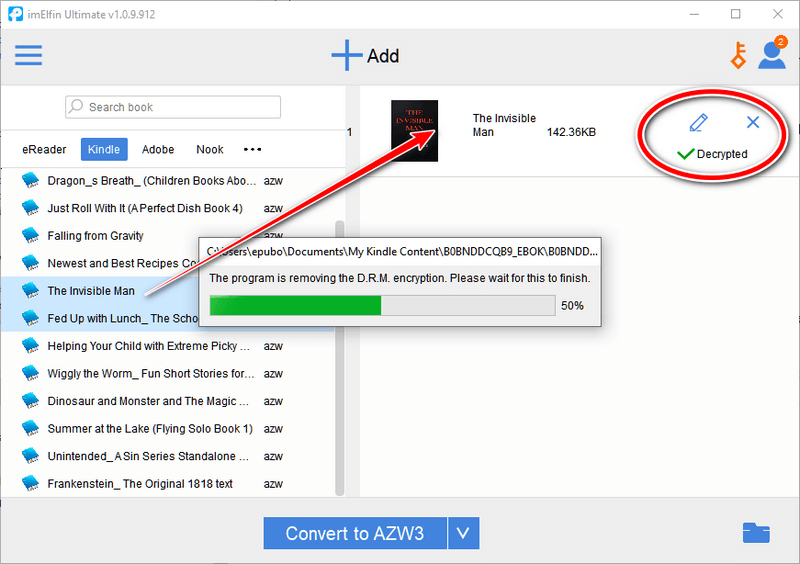
Step 5: Convert Kindle unlimited books to pdf, epub, azw3 or docx
You can now save your books in EPUB, PDF, or other formats directly within the software.
- No plugins to install
- No command-line steps
- Works with the latest Kindle for PC
- Supports 2025 KFX books
Final Recommendation
Choose Calibre if:
- You're comfortable with technical steps
- You're working with older Kindle books
- You want a free solution
- You don't mind troubleshooting
Choose imElfin eBook Ultimate if:
- You want a one-click solution
- You're working with newer books (including 2025 KFX)
- You value your time over money
- You prefer drag-and-drop simplicity
Both methods can successfully remove DRM, but imElfin Ultimate is super easy! If you want to save your time on studying how to install Dedrm plugin and use command line, you really should try imElfin eBook Ultimate.
Legal Disclaimer: This guide is for educational purposes only. Only remove DRM from books you personally own or have legal rights to modify.

Copyright © 2013-2026 imElfin Studio. All rights reserved.

